
The complete accounts of your company, your shop or your accounting firm
Journal, invoices, VAT and Tax Agency forms, banks, year-end closing and annual accounts in a single program. Work installed on your computer or from the browser in the cloud: it is the same program, with the same screens and the same calculations.
No sign-up · sample data · deleted when you leave
🤖 With artificial intelligence: it reads your invoices and documents and Clara answers your accounting and tax questions.
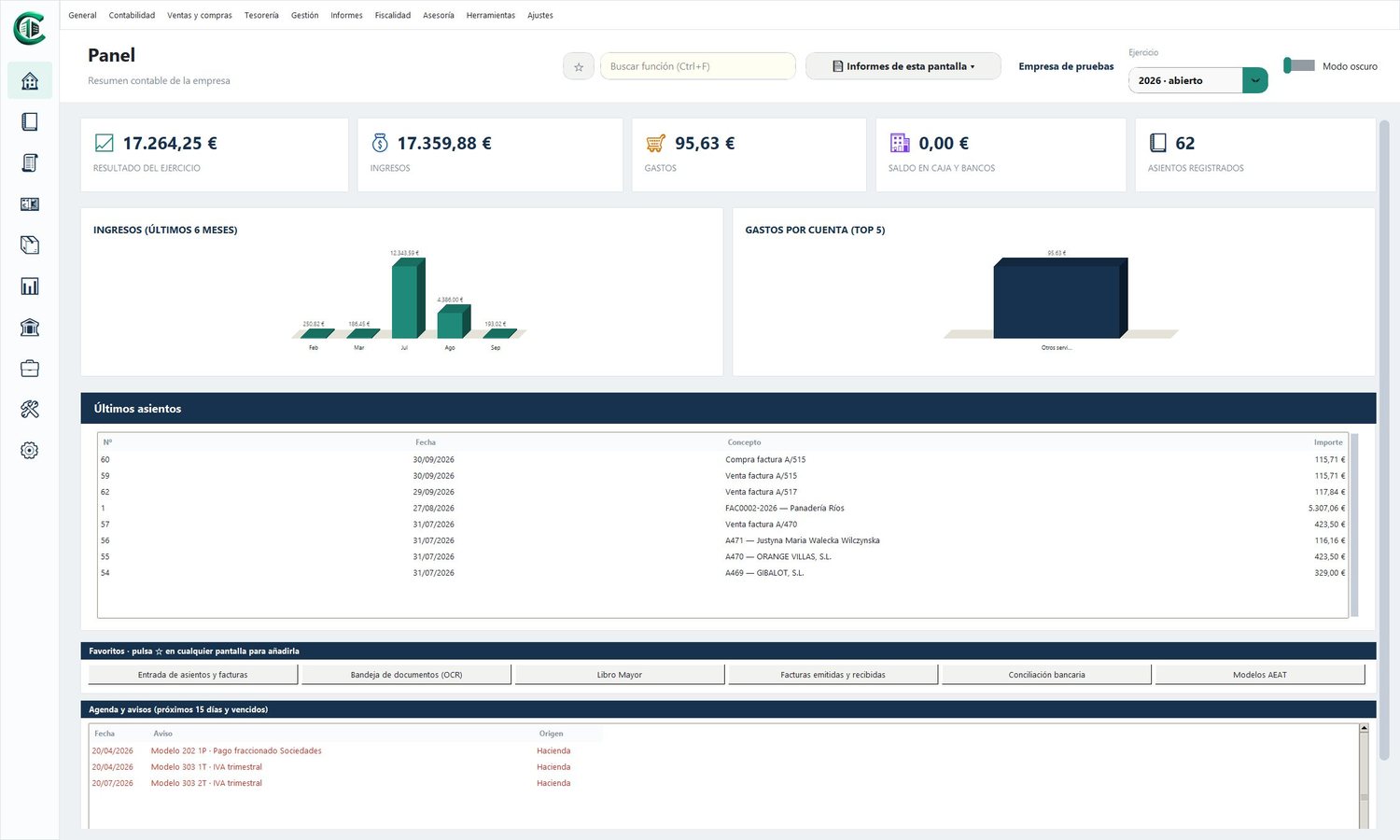
Two ways of working, one program
Choose how you want to work, or combine the two: the copy of the company opens on the desktop and in the cloud.
On your computer
The program for Windows, fast and with no need for the Internet. One or several workstations on a network sharing the same accounts.
- Works offline
- Multi-company and multi-year
- Multi-user on a local network
- One-click backups
- Keyboard shortcuts for fast typing (F4, F6, F7/F8, F9, F10)
- Help on every screen (F1) and adjustable font size
In the cloud
Log in from any browser, at the office, at home or on the move. Nothing to install and always the latest version.
- From anywhere and on any device
- Several users at once, with permissions per screen
- Your adviser can work on your accounts
- Help on every screen, adjustable font size and dark mode
- Same calculations as the desktop
With artificial intelligence
The AI does the heavy lifting; you review and decide. Nothing is posted without your confirmation.
It reads your invoices and documents
- Upload the PDF or a photo: number, date, tax ID, taxable bases by VAT rate, equivalence surcharge, withholding and total, read instantly
- Suggests the expense or income account and the entry, and checks that everything adds up
- Several scanned invoices in a single PDF? It splits them on its own, one per document
- Receipts, payslips, social security payments, tax payment receipts, loans and bank fees
- In the cloud and in the desktop program

Clara, your AI adviser
An expert in accounting, VAT, Corporation Tax, income tax for the self-employed, Tax Agency forms and deadlines, and in the whole program: she tells you how to post a transaction, which form to file and where to do it.
- Write to her or talk to her with a voice note: she answers instantly and aloud
- Inside the program she knows which screen you are on
- Try her now: 10 free questions a day
Designed for those who really keep the books

Companies and SMEs
Companies with their Corporation Tax, official annual accounts, filing with the Registry and legalisation of books.

Shops
Sales and purchases with their VAT, equivalence surcharge, cash and banks, receipts and scanned invoices that post themselves.

Self-employed
Direct assessment ledgers, form 130, withholdings for professionals and the income figures ready for the tax return.

Accounting firms and agencies
All your clients' companies, their obligations and deadlines on a single screen, disbursements, funds on account and batch reports.
Everything it does
More than forty screens covering day-to-day work and closing, identical on the desktop and in the cloud.
Entries and invoices in seconds
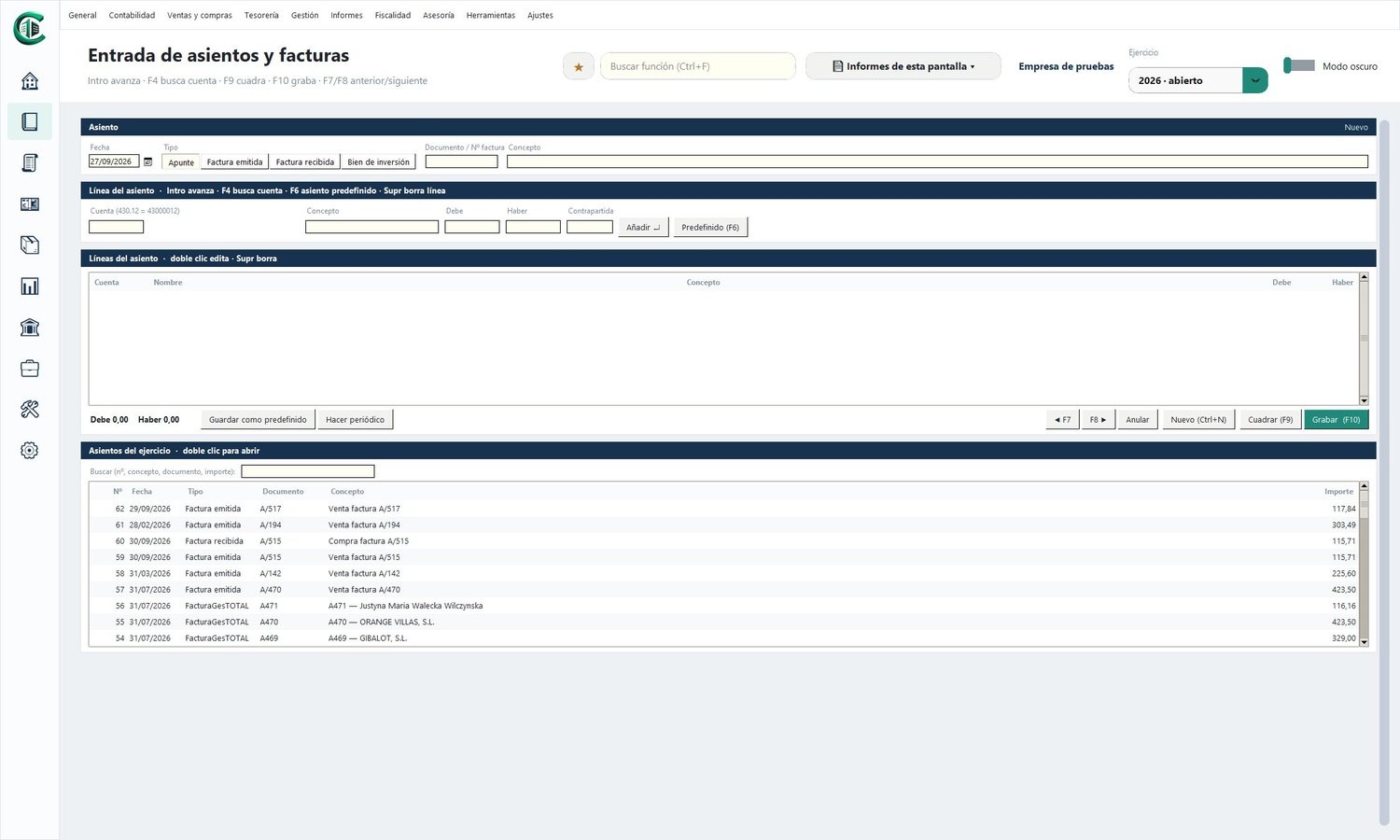
A single screen for journal lines, sales invoices, purchase invoices and capital goods. Type the short account (430.12) and the program completes it; with the contra account it builds the whole entry and, if it is an invoice, it calculates the base, VAT and withholding.
- Predefined entries with variables (F6) and a built-in library
- Recurring entries: rent, fees, insurance…
- Batch upload from Excel
- General ledger with ticking and sums of the selection
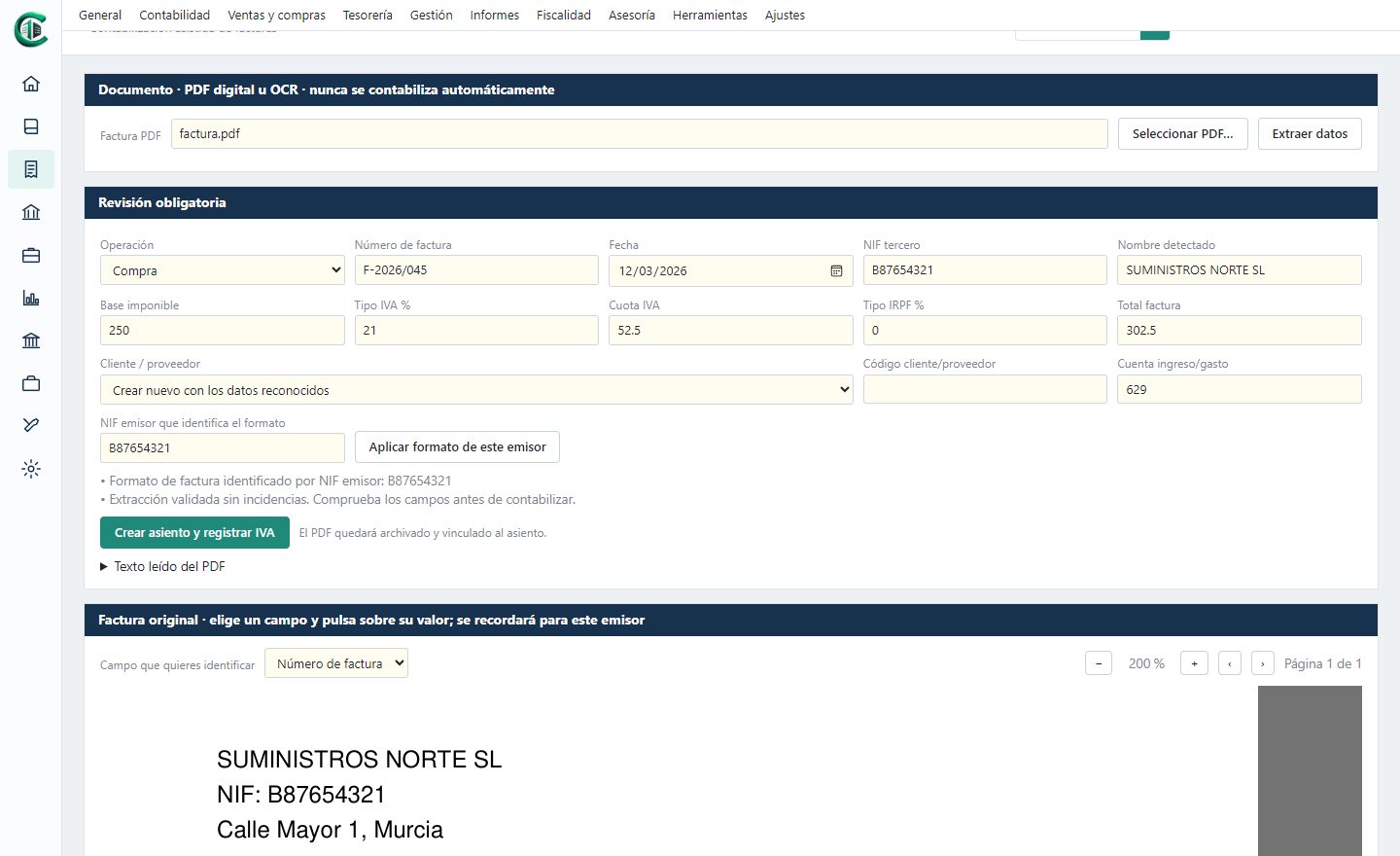
PDF invoices and scans that post themselves
Upload the invoice as a PDF, a photo or a scan: the program reads the issuer, the tax ID, the date, the base, the VAT and the total, and suggests the entry. You review it and save it. If it can't find a piece of data, you point to it once on the invoice and it remembers it for that supplier's next ones.
- Reading of text PDFs and text recognition in images
- Document inbox: invoices, receipts, payslips, social security payments, insurance bills, loan instalments and bank fees
- The PDF is filed and linked to its entry
- It never posts anything without your review
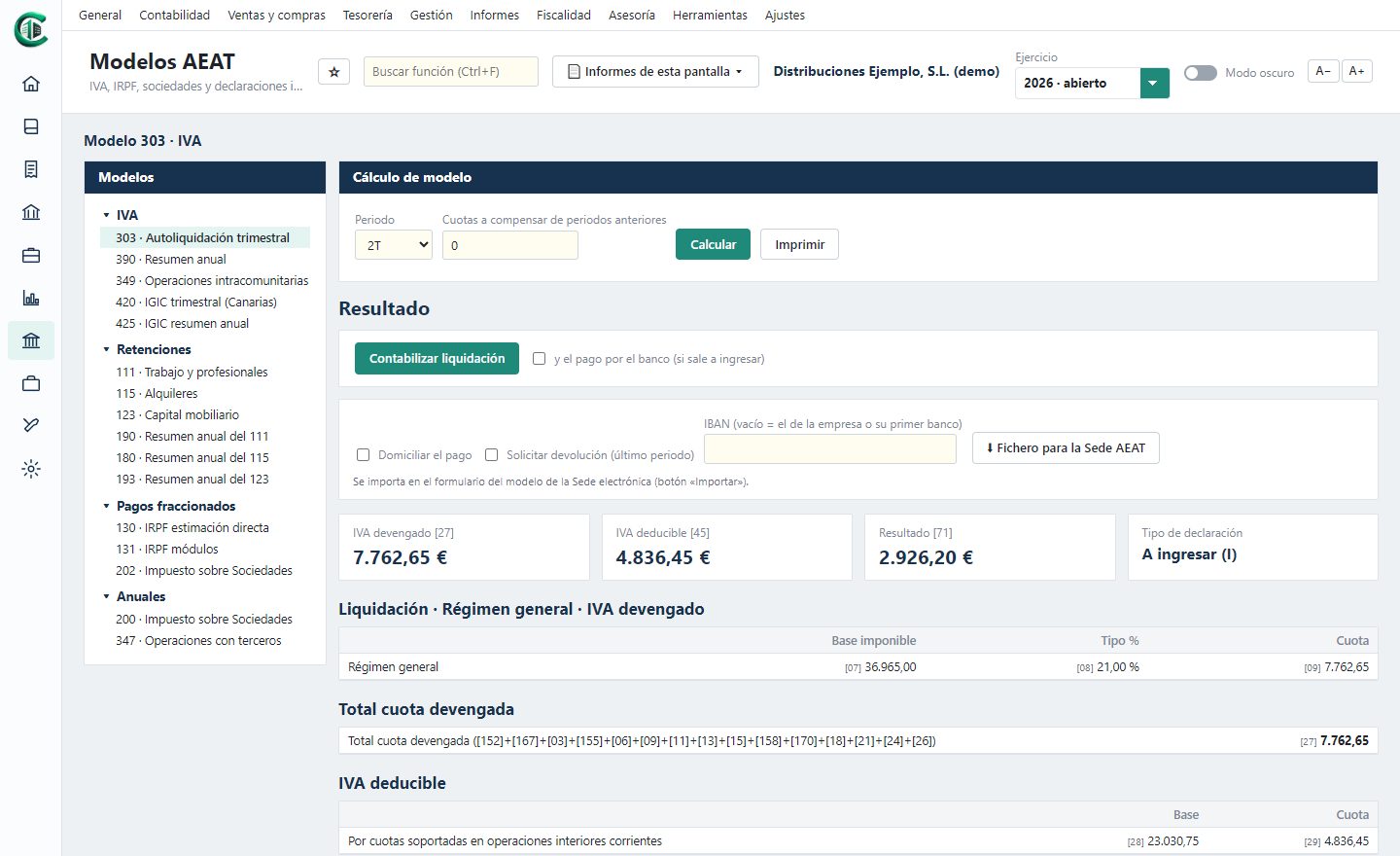
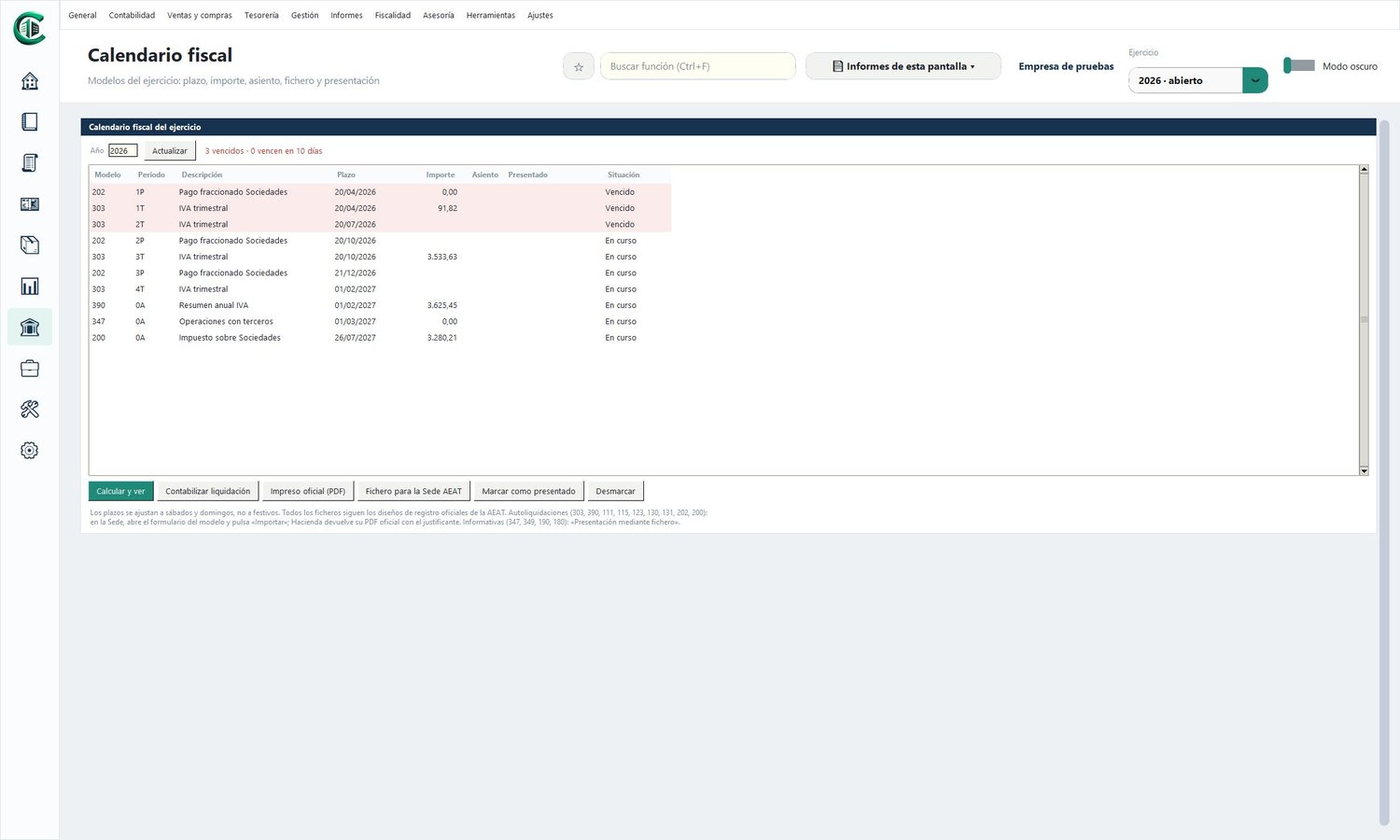
VAT and Tax Agency forms, ready to file
The forms are calculated from the accounts, box by box, with the official form and the file to import into the Tax Agency's online office. The tax calendar reminds you of every deadline and marks what has already been filed.
- VAT: 303, 390, 349, 420 and 425 (IGIC)
- Withholdings: 111, 115, 123, 180, 190 and 193
- Instalment payments: 130, 131 and 202 · Annual: 200 and 347
- VAT ledgers in the Tax Agency format
- Posting of the settlement in one click
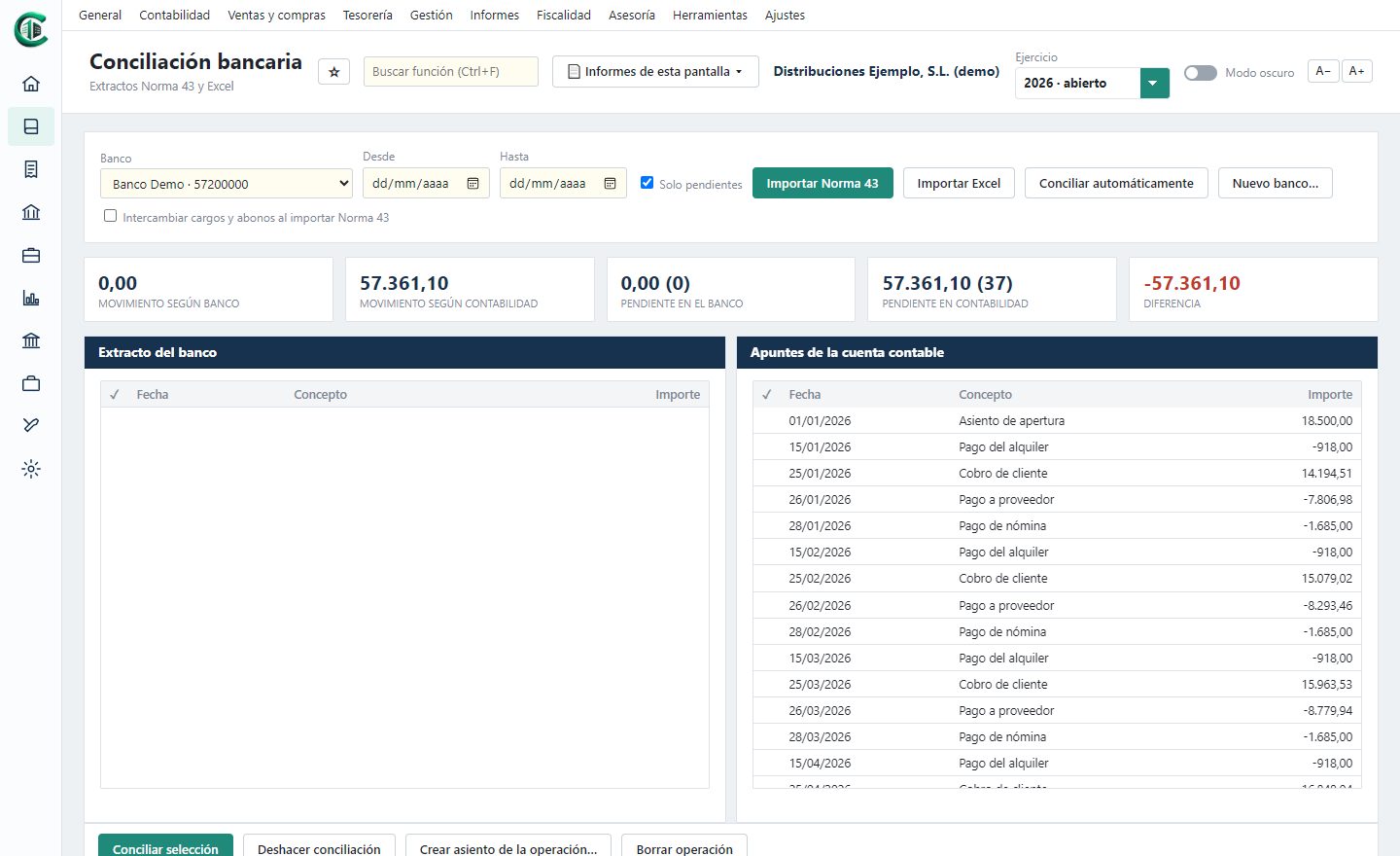
The bank reconciled with the accounts
Import your bank statement (Norma 43 or Excel) and reconcile automatically with the journal lines. Whatever is missing from the accounts, such as fees or direct debits, is posted from the transaction itself.
- Automatic and manual bank reconciliation
- Portfolio of receipts and payments, cheques, promissory notes and transfers
- SEPA direct debit batches with their file for the bank
- Loans with repayment schedule and reclassification to short term
- Treasury forecast and cash flow
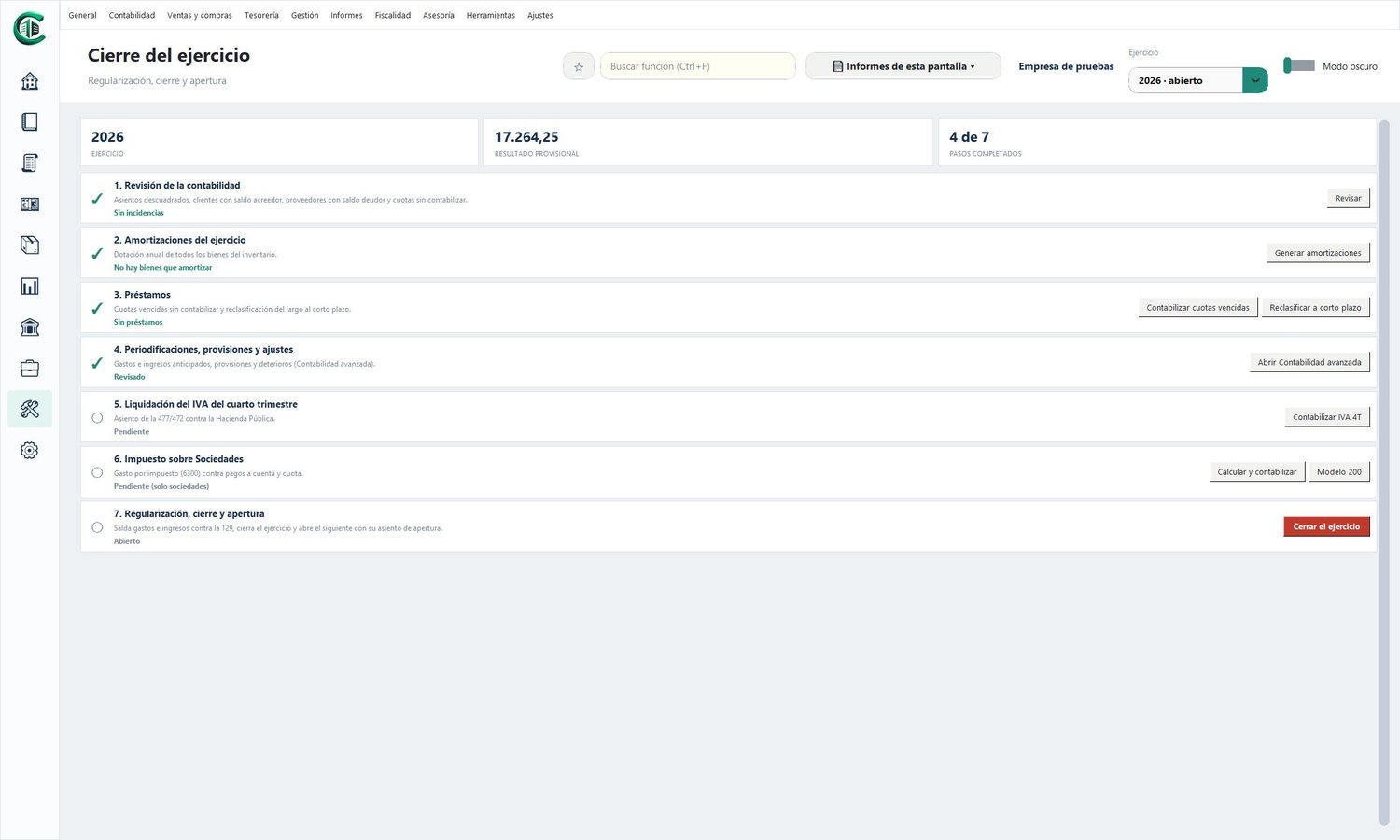
Guided year-end closing, step by step
A seven-step wizard reviews the accounts, generates depreciation, posts the loans, the fourth-quarter VAT and Corporation Tax, and closes the year and opens the next one.
- Official balance sheet and profit and loss, statement of changes in equity, cash flow statement and notes
- Filing of accounts with the codes for the Companies Registry
- Legalisation of books ready for Legalia 2
- Corporation Tax with tax losses and reserves
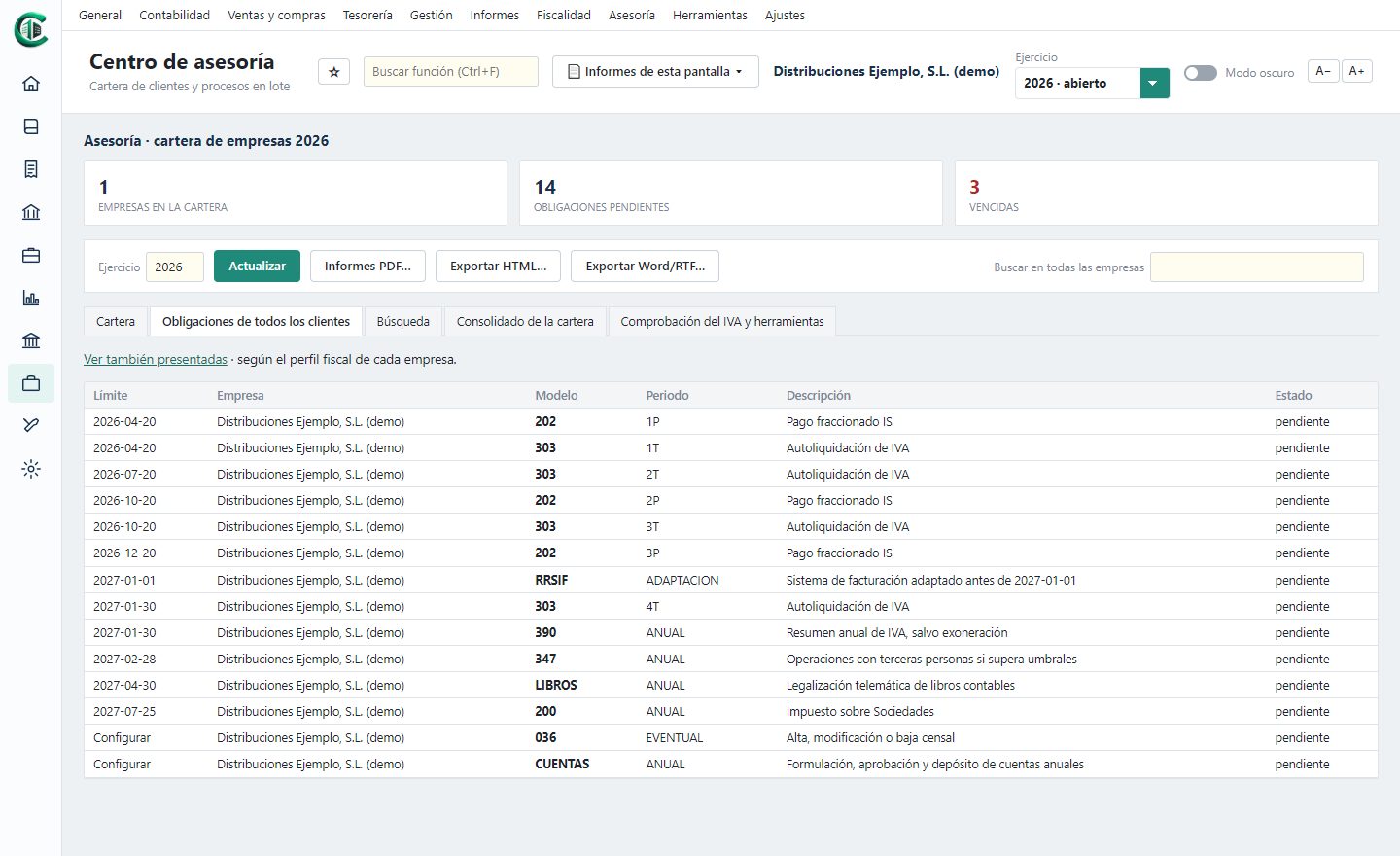
The whole firm in a single program
Your clients' accounts and the management of the firm, together. Each client with their record: services, contacts, notes, documents, their activities and the corporate side. The tax schedule tells you which returns are still to be filed for all clients, with their deadlines and the overdue ones in red. And retainers are invoiced automatically every month.
- Tax schedule: notified, received, prepared and filed
- Case files, time tracking, diary and circular letters
- Shareholders, directors, powers of attorney and deeds with their expiry dates
- Recurring fees, professional fees and disbursements with VERI*FACTU
- Portfolio, search across all companies and batch reports
Clear figures, when you need them
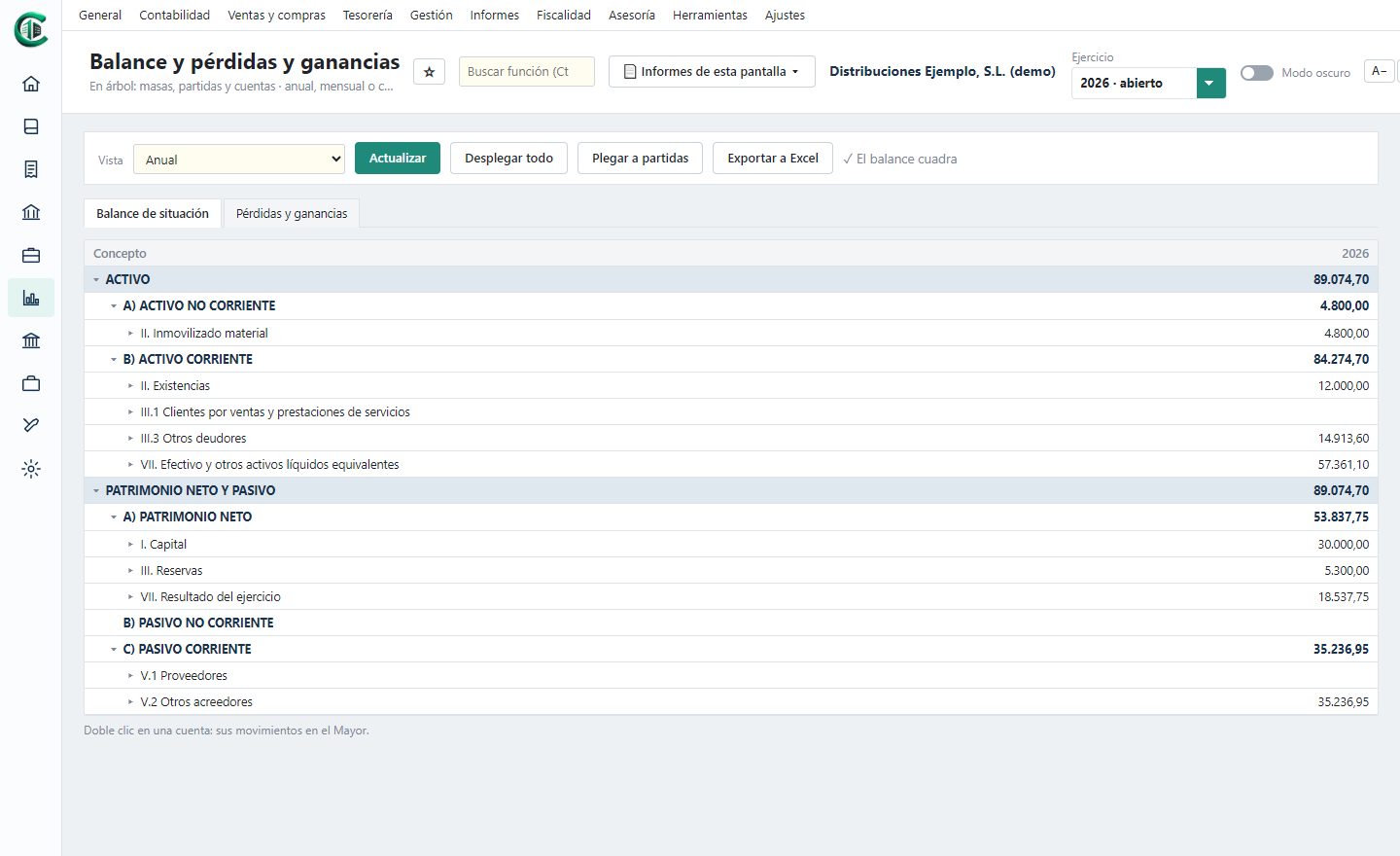
Balance sheet and profit and loss as trees that unfold down to the journal line, monthly trend and comparison with the previous year. Budgets by account and month, variances, departments or projects and explained financial ratios.
- Report centre with preview, PDF, printing and Excel
- Monthly budgets and variances
- Cost accounting by departments or projects
- Liquidity, debt, profitability and more ratios
And much more
Invoicing
For accounting firms: fees with several lines, withholding and disbursements, corrective invoices, series and VERI*FACTU record with its QR code. Companies and the self-employed invoice with FacturaGesTOTAL and their invoices flow into the accounts on their own.
Tax schedule
For accounting firms: the returns of all clients by period, generated from the forms each one files, with their deadline and status, and what has already been calculated in their accounts.
Practice management
Case files with their actions, time tracking with hours and cost per client, diary with recurring reminders, incoming and outgoing log and circular letters in Word.
Document archive
For accounting firms: each company's documents in folders (deeds, contracts, tax forms, notifications…), with search and a reminder of those about to expire, also from each client's record.
Legalisation and filing
Journal, Inventory and Annual Accounts books ready for Legalia 2, and the annual accounts with their codes, the distribution of profit and the certificate for the Companies Registry.
Users and permissions
Each user with their profile and the screens they can use in each company, read-only if needed, and one-click backups.
Corporate records
Shareholders and shareholdings, directors and attorneys with the expiry of their appointments, deeds with their registry details and related parties.
Fixed assets
Asset register with the official table of rates, automatic annual depreciation, disposals with their gain or loss and capital goods ledger.
Staff and shareholders
Staff with their month-by-month withholdings, posting of payslips and shareholders' stakes for the informative returns.
Advanced accounting
Accruals, adjustments with automatic reversal, foreign currency with exchange differences and locking of periods already closed.
Special regimes
Direct and objective assessment (modules), IGIC of the Canary Islands and equivalence surcharge.
Maintenance
Check of the accounts, numbering gaps, renumbering, change of sub-accounts and IBAN calculation from the account number.
Switch without losing anything
Bring your accounts from the program you use today: chart of accounts, customers and suppliers with their tax ID, all the entries and the VAT ledgers. All the importers are together in one place, each with what it brings and how to get the data out of your program.
With Holded, Odoo, Quipu or Business Central the data is brought straight from your account, without exporting files. And if your program is not on the list, almost all of them can export the journal to Excel or the VAT ledgers in the Tax Agency format: that is enough.
If your firm comes from NCS, besides the accounts it brings the firm's clients, case files, time records, diary, the tax schedule, shareholders and appointments, and invoicing with its retainers.
And if you invoice with FacturaGesTOTAL, our invoicing program, its sales, purchase and expense invoices go into the accounts without typing them again.
Try it now, with no obligation
Enter the demo with a sample company and go through all the screens. If it suits you, we will prepare a quote for the desktop, the cloud or both.
Photographs: Pexels